A GIF that's just over an upload limit
A small cut in length and frame rate often gets it under the line, and nobody notices the difference.
Need a GIF smaller? Change the length, width, frame rate or quality and watch the size estimate move before you convert anything. No guessing.
GIFs are already compressed, so there's no magic slider that makes one smaller for free. What works is taking stuff out: seconds nobody needs, pixels nobody will miss, frames that look just like the one before, and colours the picture can live without.
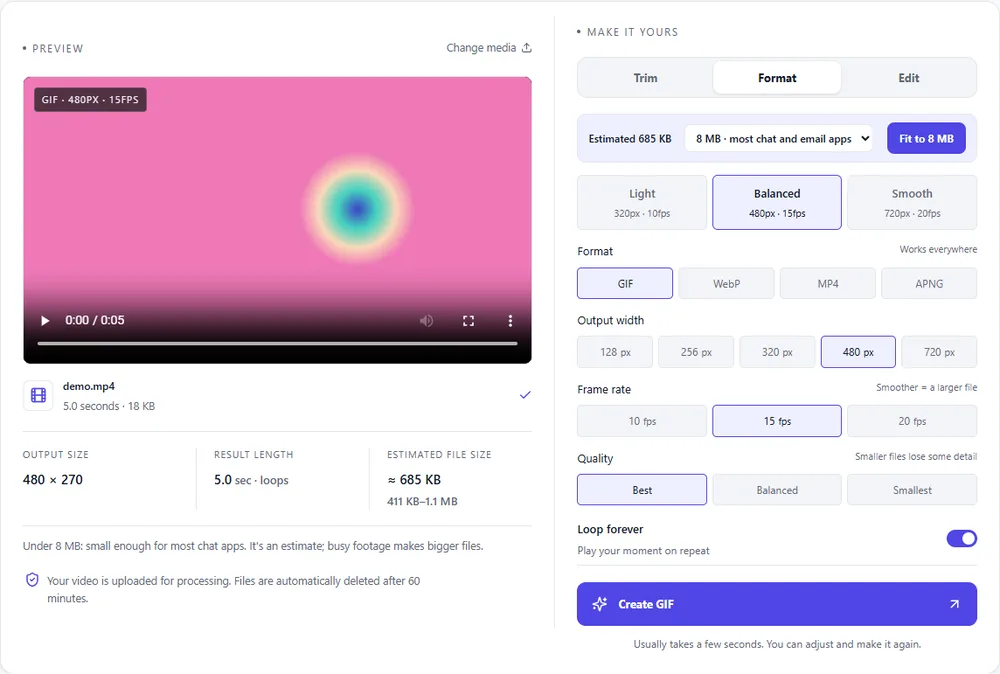
Start with the length, because that one costs you nothing in quality. Then bring the width down, which shrinks every single frame. After that, lower the frame rate (10fps is fine for slideshows and screen recordings), and only then drop quality to Balanced or Smallest.
If you've done all that and it's still too big, the format is the problem, not your settings. The same clip as WebP or MP4 is usually many times smaller than any GIF you could squeeze out.
Drop it in or paste it. The estimate shows up straight away.
Cut the seconds you don't need. It's the biggest saving, and it's free.
Try 320 to 480px and 10fps, and watch how much each change saves.
Download it and put it next to the original. Still too big? Try WebP or MP4.
Treat these as a first try, not a rule. The size estimate tells you quickly whether to nudge them up or down.
| If you're making | Try | Why it works |
|---|---|---|
| Slightly too big for an upload | Same width · 10fps · Balanced | A gentle cut that most people won't notice. |
| Needs to be much smaller | 320px · 10fps · Smallest · shorter | Turns every dial down at once. |
| Screen recording or UI | 480px · 10fps · Smallest | Flat colours squash down really well. |
| Photographic clip | 480px · 15fps · Balanced | Keeps skies and skin smoother than Smallest would. |
A small cut in length and frame rate often gets it under the line, and nobody notices the difference.
Shrinking the GIFs near the top of a page is one of the quickest ways to make it feel faster.
Plenty of inboxes and chat apps refuse or slow down big attachments. A lighter GIF just gets through.
Smallest quality only uses 64 colours. Go back to Balanced, and cut the width or length instead.
The original might already be well optimised. Change a few settings together, or move to WebP or MP4.
The frame rate's too low for fast movement. Put it back to 15fps and lower the width instead.
Use Fit to 8 MB in the Format tab. If even that can't manage it, shorten the clip or switch formats.
These are real screenshots from this site, taken with a demo clip. Your own file will give different sizes, but the controls are exactly these.
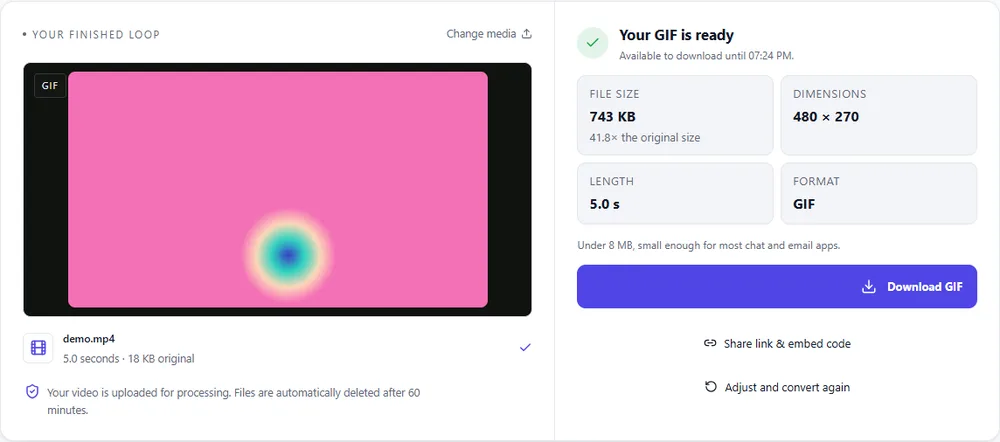
If squeezing the GIF isn't getting you there, changing the format is the strongest move you've got.
| Format | For this clip | Typical size | Good to know |
|---|---|---|---|
| WebPSuggested | Same loop, full colour, and usually the biggest saving you'll find. | About 5× smaller | Full colour, animated, loops |
| GIF | It stays a GIF, so it works everywhere. There's just a floor to how small it can go. | Largest | 256 colours, up to 720px and 20fps |
| MP4 | The smallest of all, as long as wherever it's going can play video. | About 15× smaller | Up to 1080px and 30fps, no loop flag |
| APNG | Wrong tool for this job. Lossless frames make bigger files, not smaller ones. | Larger than GIF | Lossless, full colour, loops |
Can’t find yours? The converter explains problems in plain language as they come up.
It depends on the clip. Cutting the length and width gives you the biggest savings. Switching to WebP or MP4 is usually smaller still, often by a lot.
A smaller width makes it smaller on screen, not blurry at that size. Smallest quality uses fewer colours though, so gradients can get a bit stripy.
Uploads can be up to 100 MB, and results up to 60 seconds.
Yes. Leave the width alone and lower the frame rate or quality instead, or trim the length.
No, compression throws information away, so keep your original. Every conversion here starts from the file you upload, so you can always go back to it.
It's free, there's nothing to sign up for, and your files are gone within the hour.