A reaction for the group chat
That half-second of someone's face is funnier on a loop than buried in a ten-minute video. Trim to it, crop in close, send it.
Got a video with one great moment in it? Cut out that moment, crop it, stick a caption on it if you like, and you'll see roughly how big the GIF will be before you make it.
Most good GIFs start life as an ordinary video. A clip from your phone, a screen recording, something a friend sent you at 2am. MP4, MOV and WebM all work here, and you can even drop in an existing GIF if you just want to cut it down.
The thing that makes or breaks a GIF is where you cut it. Start right as the action starts, not half a second before. End just after the punchline. Get the whole thing under five or six seconds and it'll loop nicely without turning into a huge file.
After that it's mostly taste. Crop out what nobody needs to see, add a line of text if the clip needs context, and keep an eye on the size number while you play with the settings. When it looks right, make the GIF.
Drop it into the box, paste it with Ctrl+V, or paste a direct link. It starts playing in your browser right away, so you can scrub around.
Drag the two handles until only the good part is left. Two to six seconds is usually plenty.
Crop it, add a caption, speed it up, or flip it backwards. You see all of it in the preview before anything gets converted.
Check the size estimate, hit Create GIF, and download it when it's done.
Treat these as a first try, not a rule. The size estimate tells you quickly whether to nudge them up or down.
| If you're making | Try | Why it works |
|---|---|---|
| Reaction GIF | 480px · 15fps · 2 to 4 seconds | Faces read fine at this size and the loop stays punchy. |
| Screen recording | 720px · 10fps · crop to the window | Text stays readable, and nobody notices a lower frame rate on a UI. |
| Meme with a caption | 480px · 15fps · two captions · white text | It's the layout everyone already knows how to read. |
| Seamless loop | Boomerang · 480px · 1 to 2 seconds | It plays forward then back, so there's no jump at the end. |
That half-second of someone's face is funnier on a loop than buried in a ten-minute video. Trim to it, crop in close, send it.
Record the problem, cut it down to the few seconds where it happens, and drop the GIF in the ticket. Nobody has to press play.
A short loop of your product actually doing something beats a screenshot, and email clients that block video will still show a GIF.
Cut it shorter first, then try Fit to 8 MB. If it still won't fit, WebP or MP4 will, as long as the place you're posting accepts them.
That's GIF's 256-colour limit showing. Bump quality to Best and the width up a notch, or switch to WebP, which keeps full colour.
Your browser just doesn't know that codec. Type the start and end times in by hand and convert. The server can still read it.
The result can be up to 60 seconds. Trim it, or speed it up and the limit stretches with it.
These are real screenshots from this site, taken with a demo clip. Your own file will give different sizes, but the controls are exactly these.
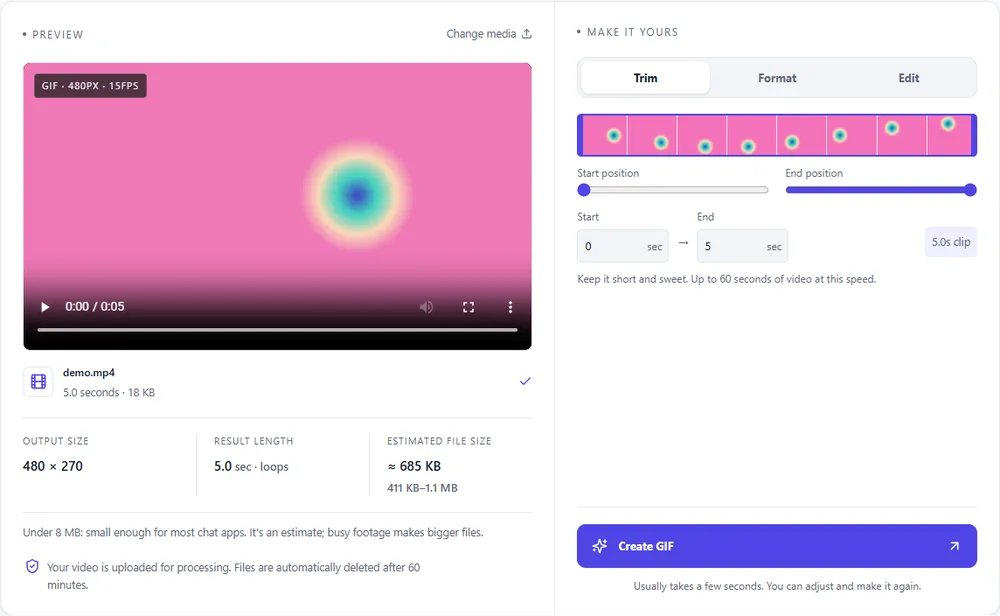
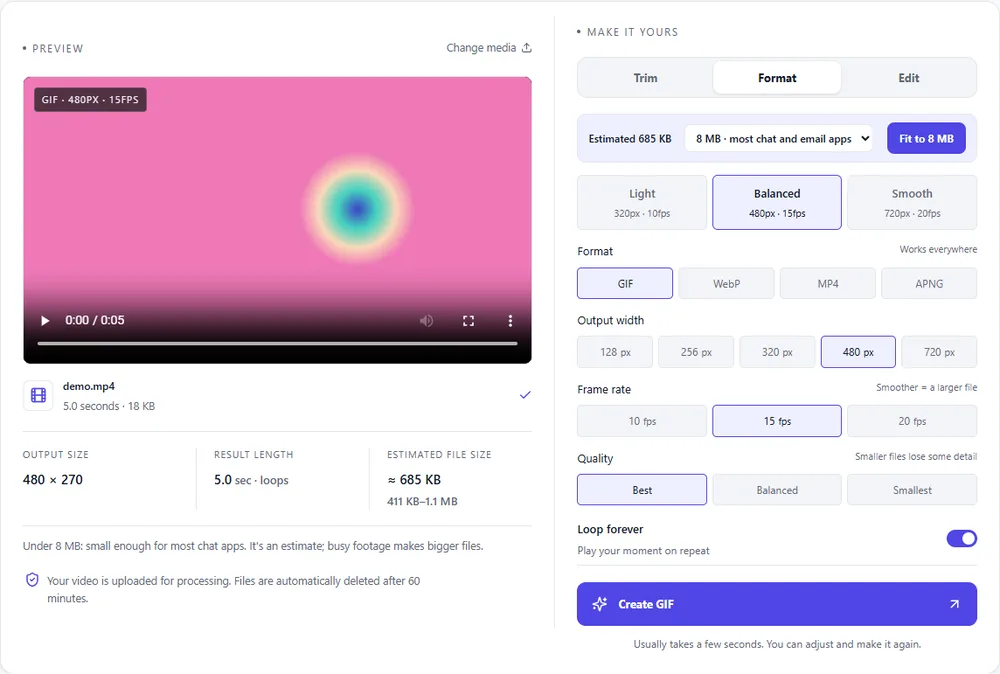
You're making a GIF, so that's the default. The others are worth a look when size or colour matters more than working everywhere.
| Format | For this clip | Typical size | Good to know |
|---|---|---|---|
| GIFSuggested | The safe choice. It plays in every chat app, doc and email client. | Largest | 256 colours, up to 720px and 20fps |
| WebP | Same loop, full colour, and usually a lot smaller. Check that wherever you're posting supports it. | About 5× smaller | Full colour, animated, loops |
| MP4 | The smallest by far, but it needs a video player and won't loop on its own. | About 15× smaller | Up to 1080px and 30fps, no loop flag |
| APNG | Lossless and crisp, but you'll pay for it in file size. | Larger than GIF | Lossless, full colour, loops |
Can’t find yours? The converter explains problems in plain language as they come up.
Add the video, drag the trim handles around the bit you want, and press Create GIF. If you want to crop it, caption it or change the speed, do that first.
MP4, MOV, WebM and GIF. You can also paste a direct link to one of those.
Up to 60 seconds. That said, a 60-second GIF is going to be enormous. Most of the good ones are somewhere between two and six seconds.
No. GIF is a silent format, so the audio gets dropped.
It's free and there's no watermark. You don't need an account either. There's an hourly limit per browser so nobody hogs the servers.
It's free, there's nothing to sign up for, and your files are gone within the hour.